
The Best Payroll for Small Business Free in 2026
If you're looking for the best payroll for small business free, here are the top options right now:
| Software | Best For | Employee Limit | Actually Free? |
|---|---|---|---|
| FreePayroll (Collegia) | Any size business | Unlimited | Yes |
| Payroll4Free | Micro-businesses | Up to 9 employees | Yes (ad-supported) |
| HR.my | Multi-user teams | Unlimited | Yes |
| ExcelPayroll | Offline/no-budget | Unlimited | Yes |
| Zoho Payroll | Indian micro-teams | Up to 10 employees | Yes (India only) |
Payroll software costs money. Most of the well-known names — QuickBooks, ADP, Gusto — charge monthly fees that add up fast.
But here's the thing: genuinely free payroll software does exist. And for small businesses with lean teams, it can work really well.
The catch? Free tools aren't all created equal. Some cap you at 9 employees. Some show ads. Some only handle tax calculations but not tax filings. Knowing the difference before you sign up saves you a lot of headaches later.
We're Caroline and Joe from Slate Ridge Accounting & Advisory, and we've put together this guide to help you find the right free payroll tool for your business.
How to Choose the Best Payroll for Small Business Free
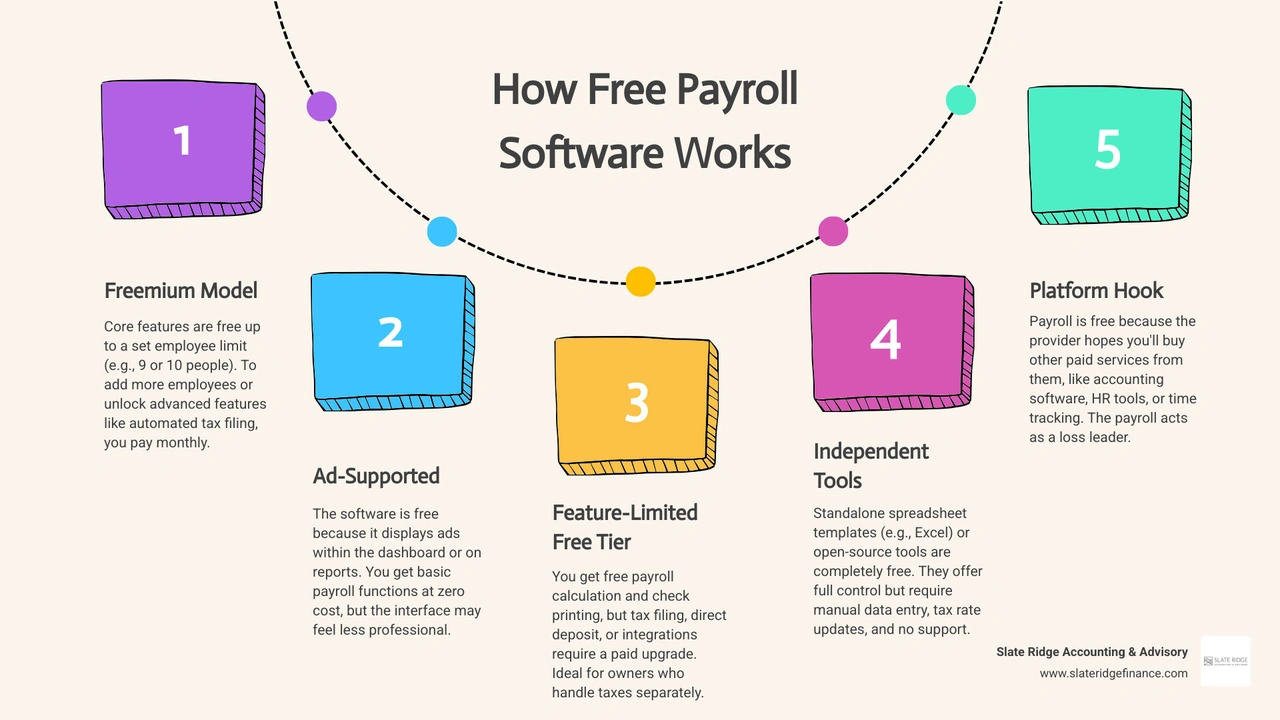
When searching for the best payroll for small business free, it helps to understand how these platforms can afford to operate without charging you a monthly subscription. Most free payroll tools use one of three business models:
- Ad-Supported: The software is completely free, but you will see targeted B2B advertisements inside the platform while processing your payroll.
- Freemium Tiers: The software is free for very small teams (usually under 10 employees) but requires a paid upgrade once your business grows or if you need advanced features like automated tax filings.
- Fintech Partnerships: Some platforms offer free payroll as a "loss leader" to encourage you to use their paid partner services, such as integrated retirement pensions or business insurance.
To choose the right tool, you must look past the "$0" price tag and evaluate the core features. At a minimum, your software should help with tracking vacation time, managing employee portals, and accurately calculating deductions.
For a complete breakdown of what to look for in a platform, check out our small business payroll software complete guide.
Additionally, compliance is everything. If you are operating in North Carolina—whether you are based in Charlotte, Raleigh, Greensboro, or Asheville—your software must accurately calculate federal withholdings as well as NC state unemployment and income taxes. Making a mistake here can lead to costly IRS or state penalties. To understand how these numbers are configured behind the scenes, read our guide on calculating payroll taxes.
Top Free Payroll Software Options for Small Businesses
Not all free payroll tools are built for the same type of business. Below, we break down the top options, their ideal use cases, and how they handle direct deposits, paper checks, and tax calculations.
FreePayroll: Best Payroll for Small Business Free with No Employee Limits
FreePayroll - the best payroll software for small businesses of any size is a cloud-based, AI-powered payroll platform trusted by over 30,000 clients. It is completely free for any number of employers or workers, making it an incredibly attractive option for growing teams.
- How it is free: FreePayroll partners with Collegia, an FCA-regulated pension provider. By offering the payroll software for free, they drive volume to their integrated pension platform, which lowers pension management costs for employees.
- The Catch for US Businesses: FreePayroll is heavily optimized for UK compliance, featuring seamless HMRC integration (RTI, FPS, EPS) and automated pension auto-enrolment. If you are a startup in North Carolina, this platform will not support your US tax filing needs out of the box. However, it is an excellent case study of how fintech partnerships can eliminate software costs entirely. If you are looking for local startup-friendly options, read our guide on payroll services for startups.
Payroll4Free: Best Payroll for Small Business Free for Under 10 Employees
Payroll4Free.com is one of the most popular permanently free payroll options for micro-businesses in the United States.
- The Limits: It is completely free to use for organizations with 9 or fewer employees paid monthly.
- How it is free: The software is entirely ad-supported. You will see small, targeted advertisements inside the platform when you log in to process payroll.
- Features: It handles basic tax calculations, tracks vacation time, provides detailed reporting, and offers an employee portal where your team can view their pay stubs.
- Payment Options: You can easily print physical paychecks for free, or you can use your own bank to process direct deposits. If you want Payroll4Free to handle direct deposits through their bank, or if you want them to deposit and file your payroll taxes automatically, they charge optional fees of $15 per month for each service. For more on setting up electronic payments, see our guide on small business direct deposit payroll.
HR.my: Best Free Multi-User Platform
HR.my is a completely free, web-based HR and payroll platform that supports unlimited users and unlimited employees.
- How it is free: The platform is funded through community donations, sponsorships, and subtle non-intrusive ads. Users can also pay a small $5 monthly sponsorship to completely remove ads and get extra file storage.
- Features: Beyond basic payroll calculations, HR.my includes robust human resource tools. It features an employee self-service portal, digital time-off requests, PTO and leave management, and expense tracking.
- Why it works: Because it supports unlimited employees, it is a great option for businesses that want a centralized hub for employee management without paying per-user fees. To learn more about managing your workforce in the cloud, read our resource on cloud payroll management.
ExcelPayroll: Best Offline Excel-Based Solution
If you are uncomfortable hosting sensitive employee financial data on a third-party cloud platform, ExcelPayroll is a fantastic offline alternative.
- How it is free: It is a completely free, pre-built application that runs directly inside Microsoft Excel. There are no monthly costs, setup fees, or hidden upgrades.
- Features: ExcelPayroll includes seven distinct modules that handle general ledger entries, accounts payable, tax calculations, and pay stub generation.
- Why it works: For micro-businesses with only one or two employees, running payroll inside a secure, offline spreadsheet is highly flexible and reliable. However, it requires a solid understanding of basic accounting principles. If you choose this route, we highly recommend reviewing our payroll accounting small business guide to ensure your books remain balanced.
Zoho Payroll: Best Free Option for Micro-Teams
Zoho is famous for its suite of business software, and its payroll solution is highly polished. However, the availability of their free tier depends entirely on your location.
- The Free Plan: Free Payroll Software For Small Businesses in India | Zoho Payroll is tailored specifically for Indian businesses. It is completely free for up to 10 employees, 1 user, and 1 work location, and features automated statutory tax deductions and direct deposit integrations.
- The US Plan: For businesses operating in North Carolina or elsewhere in the US, the free tier is not available. However, Payroll Software for Small Businesses | Zoho Payroll USA plans start at a very reasonable $34 per month. The US version supports multi-state payroll, automatic tax filings (Forms 940, 941, and W-2s), and integrates seamlessly with Zoho Books to automate your general ledger entries.
Limitations and Hidden Costs of Free Payroll Tools
While saving money on software is great, free payroll tools come with distinct trade-offs. Before moving your team to a free platform, you should be aware of the potential hidden costs and limitations:
- Manual Tax Filing: Most free tools will calculate your payroll taxes for free, but they will not file them with the IRS or the North Carolina Department of Revenue. You will have to manually fill out and submit Form 941 quarterly, Form 940 annually, and state unemployment tax returns. If you make a mistake or file late, you face expensive penalties.
- Direct Deposit Fees: Platforms like Payroll4Free charge an extra $15/month fee if you want them to process direct deposits, meaning the software is only 100% free if you print paper checks or coordinate with your own bank.
- Scaling Constraints: Free plans almost always have strict caps. If your team grows past 9 or 10 employees, you will be forced to migrate to a paid tier or switch software entirely.
- Security and Support: Free platforms rarely offer live, 24/7 phone support. If you run into a payroll error on payday, you may have to rely on email tickets or community forums.
To weigh these software costs against your administrative time, take a look at our small business payroll cost guide. If manual tax filing sounds too risky, you might want to consider transitioning to an automated payroll system to keep your business compliant.
Free Payroll vs. Paid Solutions
For very small, stable teams, free payroll software is a wonderful way to keep overhead low. But as your business grows, the time spent manually filing taxes and managing workarounds often outvalues the money saved on software.
Here is how free payroll software compares to premium, paid platforms:
| Feature | Free Payroll Software | Paid Payroll Solutions (e.g., ADP, QuickBooks) |
|---|---|---|
| Monthly Cost | $0 | $30 - $80+ base fee + $4 - $12 per employee |
| Tax Filing | Mostly manual (calculates but doesn't file) | Fully automated (federal, state, and local filings) |
| Tax Penalty Protection | None (you are liable for errors) | Up to $25,000 in protection (e.g., QuickBooks) |
| Direct Deposit | Often manual or requires an add-on fee | Same-day or next-day direct deposit included |
| Customer Support | Email-only or community forums | 24/7 phone support and dedicated payroll experts |
If you decide that automated compliance and peace of mind are worth the investment, premium platforms like RUN Powered by ADP® Payroll Software | ADP are trusted by over 900,000 small businesses. In fact, 3 out of 4 ADP customers report spending 15 minutes or less running payroll.
To explore other top-tier paid providers that offer full-service tax compliance, check out our best payroll companies small business guide.
Frequently Asked Questions About Free Payroll Software
Does free payroll software handle tax calculations and filings?
Most free payroll software will accurately calculate your federal and North Carolina state tax withholdings, but they typically do not handle the actual tax filings or payments to government agencies. You will receive reports showing how much you owe, but you must manually submit the payments and file the forms (like Form 941 and NCUI 101) yourself. If you want these filings handled automatically, you will need to pay for an add-on tax service or upgrade to professional payroll administration services.
How many employees can I pay with free payroll software?
It depends on the platform. Ad-supported tools like Payroll4Free limit their free tier to 9 or fewer employees paid monthly. Zoho Payroll's free plan is capped at 10 employees (and is currently limited to India). However, platforms like HR.my and ExcelPayroll allow you to pay an unlimited number of employees for free. To find the right fit for your team's size, check out our payroll services small business guide.
How do I switch from my current payroll provider to a free solution?
Switching is easiest at the start of a new calendar year or a new quarter. You will need to gather your historical payroll data, employee W-4 forms, bank routing details, and state tax identification numbers. Once you input this data into your new free software, run a parallel test payroll to ensure the tax calculations match your old system exactly. For step-by-step help with transitioning your back-office systems, read our guide on how to outsource payroll for small business.
Conclusion
Finding the best payroll for small business free is entirely possible if you have a small team and are willing to handle some of the administrative tax filings yourself. Tools like Payroll4Free and HR.my can save you hundreds of dollars a month during your early stages of growth.
However, as your business expands, managing payroll, tracking compliance, and keeping your books balanced can quickly become a full-time job.

At Slate Ridge Accounting & Advisory, we help small businesses across North Carolina—from Asheville and Hickory to Charlotte, Raleigh, and Wilmington—streamline their financial workflows. Whether you need virtual bookkeeping, a complete financial clean-up, or strategic growth forecasting, we provide modern, personalized solutions tailored to your unique industry.
Let us handle the numbers so you can focus on running your business. Visit our Slate Ridge Accounting & Advisory Virtual Accounting Services page today to schedule a consultation and learn how we can support your business's financial health.
Ready to get started?
Book a free consultation today and let’s explore how Slate Ridge can support your business with expert accounting that’s accurate, timely, and built around your goals.
You Might Also Like
A few more posts we think you’ll enjoy on topics that matter to business owners like you.