

Introduction: Decoding Your Canadian Payroll Obligations
Expanding your business into Canada brings exciting opportunities, but it also introduces new compliance challenges. For US companies hiring Canadian employees, calculating payroll taxes is one of the most critical and complex tasks you'll face.
Quick Answer: How to Calculate Payroll Taxes in Canada
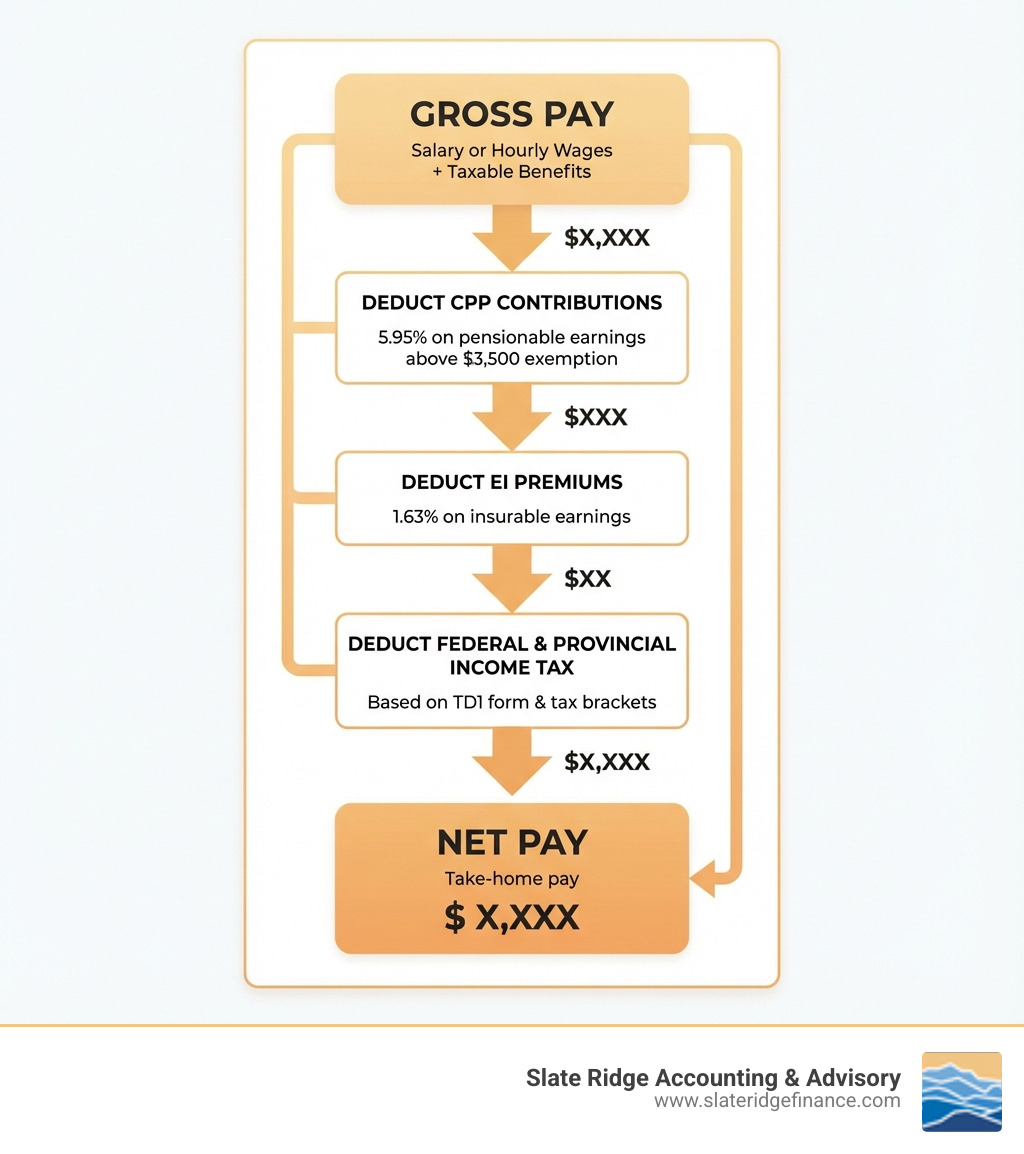
- Calculate Gross Pay - Start with the employee's total earnings (salary or hourly wages × hours worked, plus any taxable benefits).
- Deduct CPP Contributions - Apply 5.95% (2025 rate) to pensionable earnings above the $3,500 basic exemption.
- Deduct EI Premiums - Apply 1.63% (2025 rate) to insurable earnings up to the annual maximum.
- Calculate Income Tax - Apply federal and provincial tax rates based on the employee's TD1 form and tax brackets.
- Subtract Total Deductions - Gross Pay minus all deductions equals Net Pay (take-home pay).
Getting payroll wrong leads to real consequences: penalties from the Canada Revenue Agency, unhappy employees, and hours spent fixing avoidable mistakes.
Fortunately, while the calculations involve multiple components, the process follows a logical sequence. Once you understand the three main deductions—Canada Pension Plan (CPP), Employment Insurance (EI), and Income Tax—you can confidently process payroll for your Canadian team.
This guide walks you through each step of calculating payroll taxes for employees in Canada. You'll learn the current rates and maximums, understand how to use government tools like the Payroll Deductions Online Calculator (PDOC), and find when it makes sense to automate or outsource the process.
Whether you're processing payroll manually or evaluating software, this guide provides the foundation for accurate calculations and full compliance with Canadian payroll laws.
Calculating payroll taxes terms to remember:
Understanding the Core Components of Canadian Payroll Deductions
For any business with employees in Canada, accurate payroll deductions are critical. They ensure correct pay, legal compliance, and avoidance of costly penalties from the Canada Revenue Agency (CRA) or Revenu Québec. Payroll isn't just about paying wages; it's about withholding and remitting specific amounts to the government on behalf of your employees.
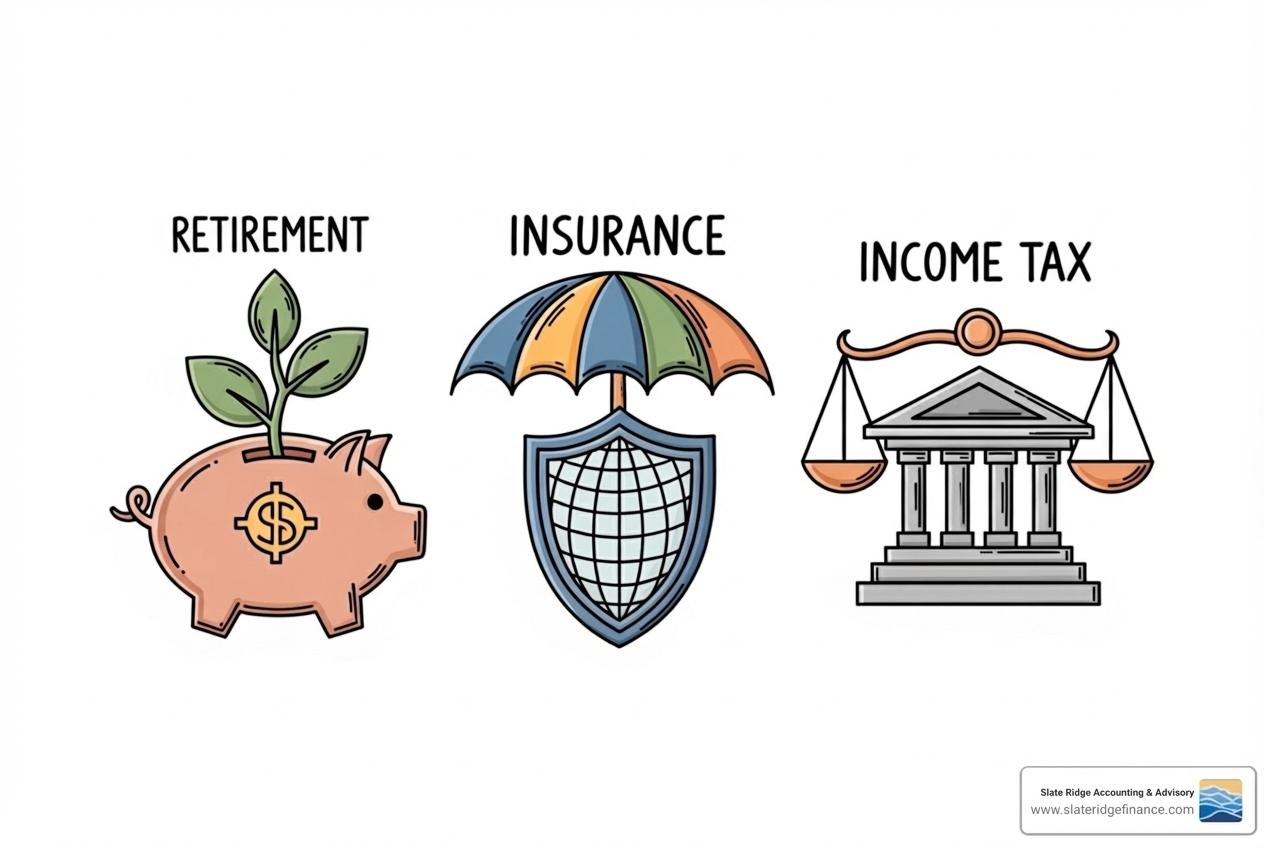
The main components of payroll deductions in Canada are the Canada Pension Plan (CPP), Employment Insurance (EI), and federal and provincial income tax. Let's break down how to arrive at these figures, starting with gross salary.
How to Calculate an Employee's Gross Salary
An employee's gross salary is their total earnings before any deductions. This is the starting point for all payroll calculations.
- For Salaried Employees: This is typically straightforward. Divide an employee's annual salary by the number of pay periods in the year (e.g., annual salary / 26 for bi-weekly pay).
- For Hourly Employees: Multiply their hourly rate by the number of hours worked in the pay period, including any overtime hours at the appropriate rate.
- Taxable Benefits: Many employers offer benefits like company cars or group term life insurance. The value of any benefits the CRA considers "taxable" must be added to an employee's gross earnings before calculating deductions to ensure correct withholding.
Once we have the gross salary, we can move on to the mandatory deductions.
Calculating Canada Pension Plan (CPP) Contributions
The Canada Pension Plan (CPP) is a mandatory social insurance program providing partial income replacement for retirement, disability, or death. All employees across Canada (except in Quebec, which has the Quebec Pension Plan or QPP) contribute to the CPP.
CPP contributions are shared between the employee and the employer. For 2025, the standard CPP contribution rates are 5.95% for both employees and employers. These rates apply to an employee's pensionable earnings with a few key considerations:
- Year's Maximum Pensionable Earnings (YMPE): A maximum annual earnings amount on which CPP contributions are calculated. Earnings above this are not subject to CPP.
- Basic Exemption: Employees have a basic CPP/QPP exemption of $3,500 annually. The first $3,500 of annual earnings is exempt from CPP contributions. This exemption is prorated across each pay period.
- CPP Improvement (CPP2): As of January 2024, pensionable earnings between the YMPE and a new, higher threshold (Year's Additional Maximum Pensionable Earnings or YAMPE) are subject to second additional CPP/QPP contributions (CPP2/QPP2). For 2024, this rate is 4% with a maximum contribution of $188 per employee.
For example, for 2024, the CPP rate is 5.95% with an annual maximum contribution of $3,867.50 per employee.
Quebec Pension Plan (QPP) Differences: Employers in Quebec contribute to the Quebec Pension Plan (QPP) instead of CPP. The QPP operates similarly but has different rates and maximums. For 2024, the QPP rate is 6.40% with an annual maximum contribution of $4,160 per employee.
You can always find the most up-to-date figures on the Canada Pension Plan contribution rates and maximums.
Calculating Employment Insurance (EI) Premiums
Employment Insurance (EI) provides temporary financial assistance to unemployed Canadians, plus benefits for maternity, parental leave, and sickness. Both employees and employers contribute to EI.
- Premium Rates: For 2025, the employee EI premium rate is 1.63% on income up to the maximum annual insurable earnings.
- Maximum Insurable Earnings (MIE): Similar to CPP, there's a maximum amount of earnings on which EI premiums are calculated annually. Once an employee's earnings surpass this MIE, no further EI premiums are deducted for that year.
- Employer Contribution Multiplier: Employers pay 1.4 times the employee's EI premium rate. For every $100 an employee pays in EI, the employer contributes $140.
The current EI premium rates and maximums are updated annually by the government.
Quebec Parental Insurance Plan (QPIP): In Quebec, EI premiums are reduced because the province has its own Quebec Parental Insurance Plan (QPIP). Wage earners, self-employed workers, and employers all pay QPIP premiums, which fund maternity, paternity, parental, and adoption benefits.
Calculating Federal and Provincial Income Tax
Income tax is the largest deduction from an employee's pay. Canada has a progressive tax system: the more an employee earns, the higher their tax rate. Income tax is levied by both the federal and provincial/territorial governments.
- Tax Brackets: Both federal and provincial governments establish tax brackets, which are income ranges taxed at specific rates.
- TD1 Form: Each employee must complete federal and provincial TD1 forms. These forms declare personal tax credits (like the basic personal amount) that reduce the income tax deducted from their pay. It's crucial to have these on file for accurate withholding.
- Basic Personal Amount: This is a non-refundable tax credit all individuals can claim, representing the amount of income one can earn without paying federal income tax. Provinces also have their own basic personal amounts.
- Tax Credits: Employees can claim various other tax credits (e.g., for dependents, tuition) on their TD1 forms, further reducing their taxable income and payroll tax deductions.
Calculating income tax is often the most complex part of calculating payroll taxes because it involves applying federal and provincial rates and considering personal tax credits.
A Step-by-Step Guide to Calculating Payroll Taxes
With the components understood, let's walk through calculating an employee's net (take-home) pay.

Step 1: Determine Gross Pay and Pensionable/Insurable Earnings
The first step is to determine the employee's gross pay for the pay period.
- Calculate Gross Pay: Sum all wages, salaries, bonuses, and the value of any taxable benefits for the period.
- Identify Taxable Benefits: Ensure the value of taxable benefits is included in the gross pay figure.
- Determine CPP Pensionable Earnings: From the gross pay, subtract the prorated CPP basic exemption amount. This is the amount on which CPP is calculated, up to the YMPE.
- Determine EI Insurable Earnings: The gross pay, up to the Maximum Insurable Earnings (MIE), is the insurable earnings for EI.
Step 2: A Practical Method for Calculating Payroll Taxes
With gross pay established, you can now apply the deduction rates.
- Deduct CPP/QPP: Multiply the CPP pensionable earnings by the current employee CPP contribution rate (e.g., 5.95% for 2025). The employer pays an equal amount.
- Deduct EI/QPIP: Multiply the EI insurable earnings by the current employee EI premium rate (e.g., 1.63% for 2025). The employer contributes 1.4 times this amount. For Quebec, you would also calculate QPIP premiums.
- Calculate Taxable Income: Taxable income is generally gross pay minus CPP, EI, and other approved deductions like Registered Pension Plan contributions.
- Apply Federal and Provincial Tax Tables: Use the employee's TD1 forms, along with federal and provincial tax brackets, to determine the correct income tax deduction. This is best done using CRA tax tables, payroll software, or online calculators.
- Subtract Tax Credits: The personal tax credits claimed on TD1 forms reduce the amount of income tax withheld.
Step 3: Arriving at Net Pay (Take-Home Pay)
- Gross Pay: The total earnings before deductions.
- Total Deductions: The sum of all calculated deductions (CPP/QPP, EI/QPIP, income tax, etc.).
- Net Pay Formula: Gross Pay - Total Deductions = Net Pay.
The net pay is the amount the employee receives in their paychecks. Pay statements should clearly outline all gross pay components, each deduction, and the final net pay for transparency.
Example Calculation (Simplified, Bi-weekly Pay, Outside Quebec, 2025 Rates):
An employee earns a gross bi-weekly salary of $2,000.
- Gross Pay: $2,000
- CPP Deduction: Assuming earnings are above the exemption and below the YMPE, the calculation is:
- $2,000 x 5.95% = $119.00
- EI Deduction: Assuming earnings are below the MIE, the calculation is:
- $2,000 x 1.63% = $32.60
- Taxable Income for Federal/Provincial Tax: $2,000 - $119.00 (CPP) - $32.60 (EI) = $1,848.40
- Income Tax Deduction: This is calculated based on the $1,848.40 taxable income, applying tax tables and the employee's TD1 claims. We'll estimate this at $250 for this example.
- Total Deductions: $119.00 (CPP) + $32.60 (EI) + $250.00 (Income Tax) = $401.60
- Net Pay: $2,000 (Gross) - $401.60 (Total Deductions) = $1,598.40
This example highlights the process, but actual income tax calculations are more intricate and rely on detailed tables and personal claims.
Using Government Tools: PDOC and WebRAS
Manual payroll calculations are prone to error. Thankfully, the Canadian government provides free tools to help businesses accurately calculate payroll deductions. These tools reduce errors and ensure you're always using the most current rates.
Using the CRA's Payroll Deductions Online Calculator (PDOC)
The CRA's Payroll Deductions Online Calculator (PDOC) is a free tool for calculating federal, provincial, and territorial payroll deductions. It's a lifesaver for businesses managing payroll in-house without dedicated software.
- What is PDOC? It's an online calculator that takes an employee's gross pay, pay frequency, province, and TD1 claims, then automatically calculates the correct CPP, EI, and income tax deductions.
- Who Can Use It? Any employer with staff in Canada can use PDOC, except for those with employees in Quebec, who must use WebRAS.
- How to Use PDOC: Input the required information (gross pay, pay period, province, TD1 amounts), and PDOC generates the exact deduction amounts. It's invaluable for accuracy without consulting complex deduction tables. Find it on the CRA's Payroll Deductions Online Calculator page.
Best Practices for Accuracy and Data Security:
- Input Data Carefully: Double-check all figures, especially gross pay and TD1 amounts.
- Clear Cache & Update Software: Before using PDOC, clear your browser's cache and ensure your OS and browser are updated for security and access to the latest version.
- Report Problems: If you encounter issues, the CRA encourages you to report them with details about your browser and calculation.
Special Considerations for Quebec Employers (WebRAS)
Quebec has unique payroll requirements, including the Quebec Pension Plan (QPP) and the Quebec Parental Insurance Plan (QPIP). Employers with employees in Quebec cannot use PDOC.
- Revenu Québec: This is Quebec's provincial tax authority.
- WebRAS Calculator: Revenu Québec provides its own online tool, WebRAS, for employers to calculate provincial deductions like QPP, QPIP, and provincial income tax. This is essential for compliance with Quebec's payroll laws.
- QPP Contributions: QPP replaces CPP in Quebec, with its own rates and maximums. Details on QPP contributions are available from Revenu Québec.
- QPIP Premiums: These mandatory premiums fund Quebec's parental insurance plan.
Employer Compliance: Remittance, Reporting, and Best Practices
Correctly calculating payroll taxes is the first step. Employers must also remit these deductions to the government and report them accurately to avoid significant penalties.
Remitting Deductions and Filing T4 Slips
Once calculated, deductions must be sent to the CRA (and Revenu Québec for provincial amounts).
- Remittance Frequency: The CRA determines your remittance frequency based on your average monthly withholding amount (AMWA). New employers typically remit monthly, with payments due by the 15th of the following month. Larger employers may be required to remit more frequently (accelerated remitters).
- How to Remit to the CRA: You can remit deductions electronically via your CRA My Business Account, online banking, or Electronic Funds Transfer (EFT).
- T4 Slip Requirements: At year-end, you must prepare and file T4 slips (Statement of Remuneration Paid) for each employee, summarizing their total earnings and deductions. Employees use these to file their personal tax returns.
- Filing Deadlines: T4 slips must be issued to employees and filed with the CRA by the last day of February of the following year.
- Record Keeping: You must keep all payroll records for at least six years for potential audits or inquiries.
Avoiding Common Pitfalls and Penalties
Payroll mistakes can be costly, as the CRA is serious about compliance.
- Incorrect Calculations: Using outdated rates or incorrect TD1 claims can lead to errors.
- Late Remittances: Missing a remittance deadline results in penalties (3% to 10%) and interest charges.
- Misclassifying Workers: A common pitfall is misclassifying an employee as an independent contractor, a distinction the CRA defines strictly. If a worker is deemed an employee, the employer is liable for all past unremitted deductions, plus penalties and interest.
- Interest and Penalties: The CRA charges interest on overdue amounts, and consistent non-compliance can lead to audits.
- Ensuring Compliance: Stay informed on current rates, use reliable tools like PDOC or payroll software, remit on time, and keep meticulous records. Engaging with accounting and payroll services for small business can significantly reduce this risk.
Choosing the Right Payroll Solution for Your Business
Given the complexity, choosing the right payroll solution is a key strategic decision.
- Manual Calculation Risks: Manual calculations are prone to error and difficult to keep updated with changing tax laws.
- Payroll and Billing Software: Dedicated payroll and billing software automates calculations, remittance tracking, and T4 generation, often with automatic rate updates.
- Outsourced Payroll Services: Outsourcing to a provider is an excellent option for businesses that find payroll too complex. These services handle all calculations, remittances, and reporting. Many small business online payroll services offer comprehensive solutions.
- Scalability: Your chosen solution should be able to grow with your business.
Frequently Asked Questions about Calculating Payroll Taxes
What happens if I don’t make payroll deductions correctly?
Incorrectly handling payroll deductions leads to serious consequences, as the CRA enforces compliance strictly.
- Penalties from the CRA: Late or incorrect remittances incur penalties ranging from 3% to 10% of the amount due.
- Interest Charges: The CRA charges interest on any overdue amounts.
- Legal Repercussions: Severe cases of negligence or evasion can lead to legal action against the business and its directors.
- Employee Benefit Impact: Incorrect deductions can affect an employee's access to benefits like EI and CPP, damaging morale.
- Damaged Business Reputation: A history of payroll errors can make it harder to attract and retain talent.
Accuracy and timeliness are paramount to avoid these significant implications.
Do I have to withhold deductions if I pay myself a salary as a business owner?
Yes, if you pay yourself a salary as a business owner or shareholder, you are generally required to withhold the same deductions as any other employee.
- Income Tax: You must deduct federal and provincial income tax from your salary.
- CPP/QPP Contributions: You must contribute to the Canada Pension Plan (or QPP).
- EI Premiums: EI deductions are generally not mandatory for owners who control more than 40% of a corporation's voting shares. However, you can opt into the EI program to access special benefits. Learn more from the Canada Employment Insurance Commission.
How do changes in tax laws affect my payroll calculations?
Tax laws change frequently, directly impacting calculating payroll taxes.
- Annual Rate Updates: CPP rates, EI premium rates, and income tax brackets are typically updated annually.
- CPP Improvement: The ongoing CPP improvement (CPP2) requires adjustments to how CPP is calculated for higher earners.
- Changes to Tax Brackets and Credits: Governments can adjust tax brackets, personal amounts, and other tax credits.
- Importance of Staying Informed: Relying on outdated information will lead to incorrect deductions. Using updated payroll software or CRA tools like PDOC is the best way to ensure compliance.
Simplify Your Payroll and Focus on Growth
For a US business, calculating payroll taxes for Canadian employees can feel like navigating a maze. The process is laden with detail, from deducting CPP and EI to ensuring timely remittances and year-end T4 reporting. The complexity only increases with changing tax laws and unique provincial requirements like those in Quebec.
At Slate Ridge Accounting & Advisory, we understand that your time is best spent growing your business, not wrestling with intricate cross-border payroll. As a cloud-based accounting firm, our virtual services provide seamless support, whether your team is in North Carolina or Canada. We offer modern, personalized financial solutions to simplify these essential tasks, taking the burden of payroll off your shoulders so you can track KPIs and forecast growth.
Don't let payroll complexities slow you down or expose you to unnecessary risks. Let us handle the math so you can focus on what you do best.
Ready to get started?
Book a free consultation today and let’s explore how Slate Ridge can support your business with expert accounting that’s accurate, timely, and built around your goals.
You Might Also Like
A few more posts we think you’ll enjoy on topics that matter to business owners like you.