
Understanding QuickBooks Helper: Your Guide to Getting Support
QuickBooks helper refers to the suite of support tools and services available to assist you with bookkeeping and accounting tasks within QuickBooks. Whether you're stuck on a transaction, confused about a report, or need help setting up your account, understanding what's available can save you hours of frustration.
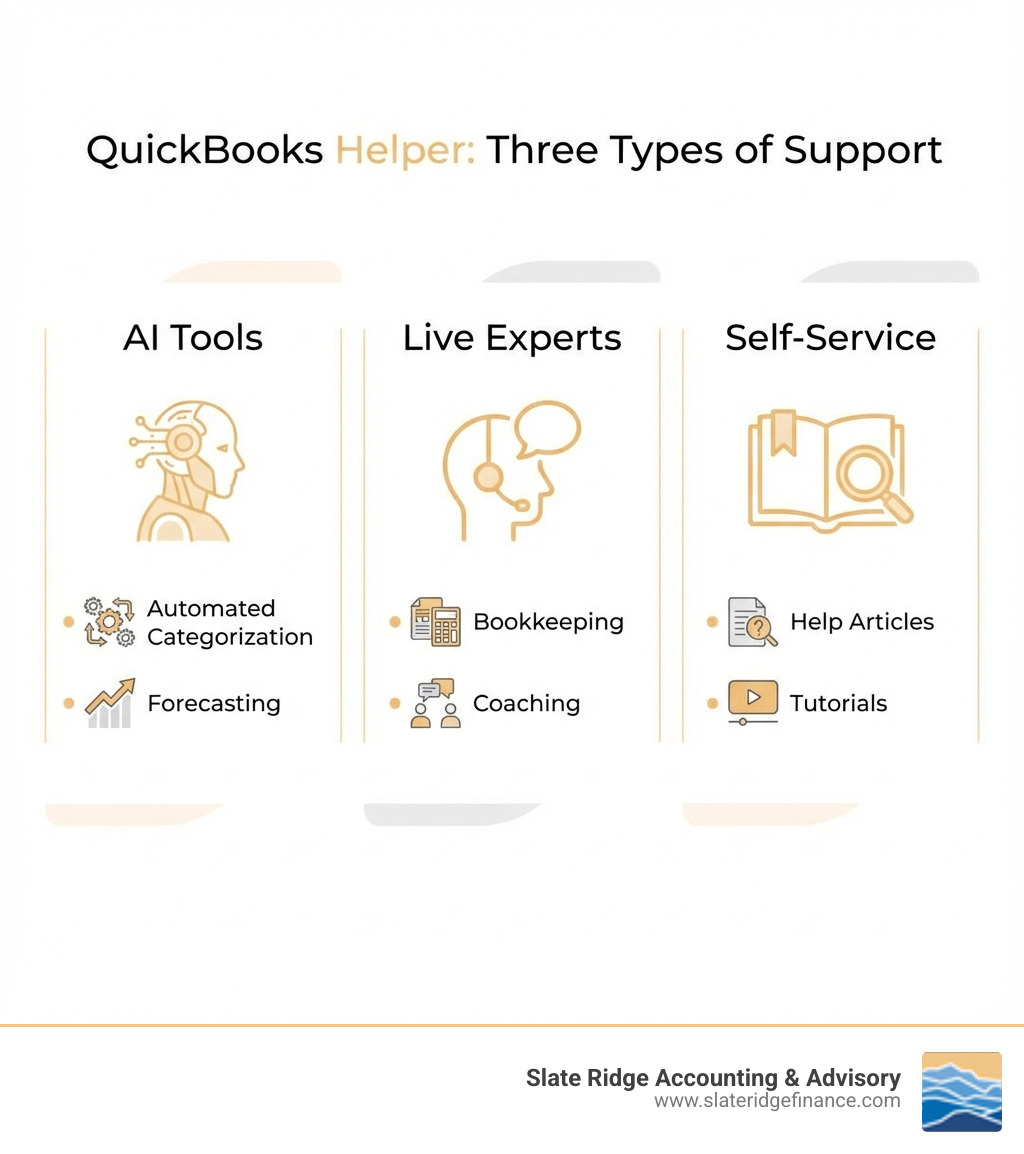
Three main types of QuickBooks helper services exist:
- AI-Powered Tools - Intuit Assist and automated agents that categorize transactions, spot inconsistencies, and suggest next steps
- Live Expert Support - Human bookkeepers and accountants available through QuickBooks Live services or third-party partners like Slate Ridge
- Self-Service Resources - In-app help, searchable articles, and tutorials on the QuickBooks Learn and Support site
The challenge? Many small business owners don't know which option to use when. According to Intuit, 74% of customers say their AI assistant gives them a better view of their business's financial health, but AI can't handle everything. Some tasks require human judgment, especially when dealing with complex accounting principles, tax-specific questions, or strategic financial decisions.
What QuickBooks helpers can do: Setup and data entry, transaction categorization, invoicing and bill pay, expense tracking, financial reporting, payroll processing, and general bookkeeping questions.
What they cannot do: Prepare tax returns, provide tax advice specific to your situation, handle specialized accounting like GAAP or crypto, or set up third-party app integrations.
The support you can access also depends on your subscription tier. QuickBooks Online Simple Start, Essentials, Plus, and Advanced each offer different support hours and features. Elite users get priority support and tax penalty protection up to $25,000.
This guide will help you steer the full ecosystem of QuickBooks support options, understand what each service includes, and determine when you might need additional help from a professional like Slate Ridge Accounting & Advisory.
Quickbooks helper terms explained:
Understanding the Ecosystem of QuickBooks Helper Services
Navigating your business's finances can feel like a complex puzzle, but with the right QuickBooks helper, you don't have to go it alone. QuickBooks offers a comprehensive suite of assistance, ranging from sophisticated artificial intelligence to real human experts, all designed to simplify your bookkeeping and accounting needs. This ecosystem ensures that whether you have a quick question or require in-depth strategic guidance, there's a layer of support ready for you.
We understand that choosing the right support can be daunting. From our experience in providing Modern Accounting Practices to businesses across North Carolina, we've seen how effective leveraging these tools can be. Let's break down the different facets of the QuickBooks helper ecosystem.
What is the AI-Powered QuickBooks Helper?
Imagine having a smart assistant that never sleeps, constantly analyzes your financial data, and even anticipates your needs. That's essentially what the AI-powered QuickBooks helper brings to the table, primarily through Intuit Assist and its specialized AI agents. This isn't just about automation; it's about intelligent automation that learns and adapts to your business.
The benefits of using QuickBooks' AI-powered agents and automated tools are significant:
- Automated Transaction Categorization: The AI agents can quickly and accurately categorize your transactions, learning from your past entries to improve speed and consistency. This frees up valuable time you'd otherwise spend manually sorting through expenses.
- Cash Flow Forecasting: Intuit Assist can help you forecast your cash flow up to 90 days ahead, providing a clearer picture of your financial future. This insight is invaluable for making informed decisions and ensuring you have the funds when you need them.
- Lead Identification: A Customer Agent can identify new leads from your email inbox and even draft personalized follow-ups for your review and sending, helping to keep your business growing.
- Payroll Data Collection: The Payroll Agent proactively collects time and attendance data from employees and spots inconsistencies, taking the prep work out of payroll and improving efficiency.
- Proactive Recommendations: AI agents can update transactions, spot inconsistencies, and proactively recommend next steps, ensuring accuracy and giving you more control over your financial health. This helps us, and you, to get a better view of your business's Financial Performance Analysis.
These tools are designed to streamline your operations, reduce errors, and provide deeper insights into your financial health. In fact, a remarkable 74% of customers report that Intuit Assist gives them a better view of their business's financial health.
Choosing the Right Human QuickBooks Helper: Slate Ridge Experts
While AI offers incredible efficiency, some situations demand the nuanced understanding and strategic insight that only a human expert can provide. This is where human QuickBooks helper services come in, both directly from QuickBooks and through trusted partners like us at Slate Ridge Accounting & Advisory.
QuickBooks offers:
- QuickBooks Live Expert Assisted Bookkeeping: Provides access to bookkeepers who offer resource support and general information on common tax questions related to regulations, deadlines, deductions, business entity, payment options, payroll tax, sales tax, and 1099 filings. They can guide you through QuickBooks setup and answer questions based on the information you provide.
- QuickBooks Live Expert Full-Service Bookkeeping: A more comprehensive service that includes initial cleanup and ongoing full-service bookkeeping.
However, it's important to understand the limitations of these services. QuickBooks bookkeepers will not assist with the preparation of federal and/or state tax returns, nor will they provide tax preparation advice specific to your business's unique situation. They also don't typically offer specialized accounting guidance (like GAAP, accrual, multi-currency, or cryptocurrency) or in-depth financial or business advisory services. For these needs, QuickBooks often refers users to their QuickBooks-certified ProAdvisor program.
This is precisely where Slate Ridge Accounting & Advisory, with our virtual accounting team, steps in. As dedicated Bookkeepers Near Me for businesses in Asheville, Boone, Charlotte, Greensboro, Hickory, Morganton, Raleigh, and Wilmington, NC, we offer a more personalized and extensive human QuickBooks helper experience. Our experts provide:
- Full-Service Bookkeeping: Beyond basic data entry, we ensure your books are carefully maintained, reconciled, and provide a clear picture of your financial standing.
- On-Demand Coaching & Advisory: We don't just process transactions; we offer strategic financial coaching custom to your industry. This includes expert advice on business decisions, specialized accounting needs (like accrual accounting or multi-currency transactions), and help with integrating third-party apps.
- Industry-Specific Solutions: Our expertise allows us to provide insights and solutions that are directly relevant to your business type, helping you track KPIs and forecast growth effectively.
- Proactive Problem Solving: We act as your financial partner, proactively identifying issues, optimizing processes, and ensuring compliance, going beyond the general information provided by QuickBooks' internal bookkeepers.
By choosing our experts, you gain a dedicated partner who understands the nuances of your business and can provide the in-depth support and strategic advice that generic QuickBooks helper services may not cover.
Core Tasks and Capabilities of Your QuickBooks Helper
A QuickBooks helper, whether AI-driven or human, can significantly lighten your administrative load and provide clearer financial insights. From the mundane yet critical tasks to more complex reporting, leveraging these services can free you up to focus on what you do best: running your business.
Here’s a look at the specific day-to-day and monthly tasks that can be managed, streamlining your operations.
Automating Accounts Payable and Receivable
Managing money coming in and going out is the lifeblood of any business. A QuickBooks helper can automate many aspects of your accounts payable and receivable, ensuring smooth cash flow and reducing manual errors.
- Automated Invoicing and Payment Reminders: QuickBooks can send out sales invoices and even propose personalized invoice reminders to help you collect payments faster. This ensures timely follow-ups without you having to lift a finger.
- Bill Pay: QuickBooks allows you to schedule payments for expenses like payroll, utilities, and contractors. You can even Automate your accounts payable processes directly within the platform. For more advanced solutions, our AP Automation Services can further streamline these workflows.
- Payment Processing: Understanding payment timelines is crucial for cash flow management.
- ACH Payments: A standard ACH payment typically takes 3–5 business days to deliver. However, faster ACH payments are usually delivered the next business day if scheduled before 5 PM PT the prior business day.
- Check Payments: If you're still relying on checks, expect a standard delivery time of 8–10 business days.
- Processing Times: For same-day processing, payments must be scheduled before 5 PM PT on business days. Payments scheduled after this time or on non-business days will process the next business day.
By leveraging these automated features, you can significantly improve your Tips for Managing Small Business Accounts Receivable and Payable, ensuring you get paid on time and pay your bills efficiently. For businesses needing more hands-on support in this area, our Accounts Receivable Outsourcing services can be a game-changer.
Streamlining Reporting and Financial Analysis
Understanding your business's financial performance is key to making informed decisions and planning for growth. A QuickBooks helper excels at compiling and presenting this information in an accessible way.
- Customizable Reports and Dashboards: QuickBooks allows you to tailor dashboards to highlight the insights that matter most to you. You can run insightful, customizable reports in seconds, showing where your business stands and uncovering opportunities.
- Essential Financial Statements: Generate key financial documents like Profit & Loss statements, Balance Sheets, and Cash Flow statements with ease. These reports are fundamental for understanding your business's health and are crucial for Financial Statement Preparation.
- Cash Flow Forecasting: Beyond historical data, QuickBooks can help you forecast your cash flow up to 90 days ahead, enabling proactive financial planning.
- KPI Tracking: For businesses looking to grow, tracking Key Performance Indicators (KPIs) is essential. While QuickBooks provides the data, our team at Slate Ridge can help you define and How to Track KPIs relevant to your industry, changing raw data into actionable insights for strategic growth.
- Usage Limits: That different QuickBooks Online plans offer varying capacities for tracking. For instance, QuickBooks Online Advanced includes unlimited Chart of Account entries, Tracked Classes, and Locations, whereas Essentials and Plus have limits (e.g., up to 250 accounts for Essentials and Plus, and up to 40 combined tracked classes and locations for Plus).
Navigating Tax and Payroll Assistance
Payroll and taxes are often the most complex and anxiety-inducing aspects of running a business. Fortunately, a QuickBooks helper can provide significant assistance in these critical areas, ensuring compliance and peace of mind.
Understanding Payroll Guarantees
QuickBooks Online Payroll comes with robust guarantees, giving you confidence that your employees will be paid accurately and on time, and that your tax obligations will be met.
- Payroll Accuracy Guaranteed: Available with QuickBooks Online Payroll Core, Premium, and Elite, this guarantee means QuickBooks assumes responsibility for federal and state payroll filings and payments directly from your account(s). As long as the information you provide is correct and on time, and you have sufficient funds, QuickBooks will file your tax forms and payments accurately and on time, or they will cover any resulting payroll tax penalties. This is a huge relief for businesses managing Small Business Online Payroll Services.
- Tax Penalty Protection: For QuickBooks Online Payroll Elite users, an additional layer of security is provided. If you receive a tax notice and send it to QuickBooks within 15 days, they will cover the payroll tax penalty, up to $25,000.
- Automated Tax Payments and Filings: QuickBooks automates federal and state payroll tax payments and filings, helping you stay compliant.
- Direct Deposit Options: Enjoy flexibility with next-day direct deposit (if processed before 5 PM PT the day before) or even same-day direct deposit for Premium and Elite users (if processed before 7 AM PT).
- Workers' Compensation: QuickBooks offers a Workers' Comp Payment Service (currently $5 per month for Core users) to help administer workers' compensation insurance, which is powered by NEXT Insurance. This service is available to businesses in North Carolina.
- Employee Access: QuickBooks Workforce allows employees to access their pay stubs and tax forms easily.
These features make Payroll Management Services much smoother, allowing you to focus on your team and business growth.
Tax Support: What's Included and What's Not
While a QuickBooks helper provides invaluable assistance with payroll taxes and general financial organization, it's crucial to understand the boundaries of its tax support.
- General Tax Questions: QuickBooks bookkeepers can provide general information on common tax questions related to regulations, deadlines, deductions, business entity types, business payment options, payroll tax filing, payroll tax requirements, 1099 filings, and sales tax.
- 1099 Filings: QuickBooks supports Automated 1099 e-file & delivery. You can prepare 1099s in QuickBooks, and for a fee, Intuit will e-file federal 1099s and print/mail them to your contractors. Unlimited 1099 e-file for current filing years can also include state filings for eligible states.
- Limitations: QuickBooks' internal bookkeepers will not assist with the preparation of federal and/or state tax returns. They also cannot provide any tax preparation-related questions specific to a business's unique situation. This is a critical distinction.
- Referral to Experts: If you need specific tax advice, tax preparation, or tax compliance assistance, QuickBooks typically refers you to a QuickBooks-certified ProAdvisor. This is where specialized services, such as our Virtual Tax Preparation at Slate Ridge Accounting & Advisory, become essential. Our team can provide the personalized, expert tax guidance and preparation services that QuickBooks' built-in helper cannot, ensuring your business in North Carolina remains fully compliant.
Access, Costs, and Policies: The Practical Details
Understanding how to access support, what services cost, and the relevant policies is fundamental to effectively utilizing your QuickBooks helper. We aim to explain these practical details so you can make informed decisions without any surprises.
How to Connect with Support
Connecting with a QuickBooks helper is designed to be straightforward, primarily through the in-product help menu.
- Sign in to QuickBooks Online.
- Select the (?) Help icon: This icon is usually located in the top right corner of your QuickBooks Online dashboard.
- Use the Assistant tab: Enter your question in the "Type or Ask Something" field. QuickBooks Assistant will provide answers or options. If you need to speak with a human expert, simply type "talk to an expert" into the Assistant.
- Use the Search tab: Enter your question in the "Search questions, keywords, or topics" field to find relevant articles. If you need direct contact, select the "Contact Us" option.
Support Hours: The availability of support varies depending on your QuickBooks product and subscription tier. For most QuickBooks Online products (Simple Start, Essentials, Plus), support is typically available Monday–Friday from 6 AM–6 PM PT and Saturday from 6 AM–3 PM PT, with Sundays closed. QuickBooks Online Advanced users often enjoy extended hours, including some weekend support. For specific payroll products like Guideline 401(k), live US-based support is available M-F, 6 AM–4 PM PT. We recommend checking your specific product's help section for the most current hours.
For more personalized and direct assistance, our team at Slate Ridge Accounting & Advisory is readily available to our clients across North Carolina, offering dedicated support that complements your QuickBooks platform.
Understanding Pricing and Subscription Terms
When considering a QuickBooks helper service, understanding the costs and terms is paramount.
- Subscription Costs: QuickBooks Online is a subscription-based product with various tiers (Simple Start, Essentials, Plus, Advanced), each with different monthly fees and feature sets. Similarly, QuickBooks Online Payroll has Core, Premium, and Elite tiers.
- Free Trials and Discounts: QuickBooks frequently offers free trials, typically for 30 days, for various products. New customers might also find discounts, such as 50% off for the first 3 months of service. It's always a good idea to check the current offers when signing up.
- Cancellation Policy: If you need to cancel a QuickBooks Online subscription, you can do so at any time by going to "Account & Settings" in QuickBooks Online and selecting 'Cancel.' Your cancellation will become effective at the end of the monthly billing period, and typically, you will not receive a pro-rated refund.
- Refund Policy: For specific offerings like the "Complete Training and Live Help Membership," a full refund is possible if you're unsatisfied and email support within 30 days of purchase, provided no certification has been received. If an exam has been registered for or taken, its cost will be deducted from any refund.
- System Requirements: To ensure a smooth experience, QuickBooks Online requires a persistent internet connection (high-speed recommended) and a computer with a supported internet browser or a mobile device with a supported operating system. Mobile app compatibility is available for iPhone, iPad, and Android devices, allowing features like receipt capture and mileage tracking.
- Usage Limits: Be aware of usage limits that vary by plan. For instance, QuickBooks Online Advanced offers unlimited Chart of Account entries, tracked classes, and locations, while lower tiers like Essentials and Plus have limits (e.g., up to 250 accounts, and Plus includes up to 40 combined tracked classes and locations).
For a comprehensive understanding of what's included in various packages, explore our Best Small Business Bookkeeping Packages.
QuickBooks Helper vs. Slate Ridge Virtual Accounting: Making the Right Choice
Deciding on the best financial support for your business is a critical strategic choice. You might be weighing the built-in QuickBooks helper services against the more comprehensive, personalized approach offered by a virtual accounting firm like Slate Ridge Accounting & Advisory. Both have their strengths, and understanding these differences will help you make the right decision for your North Carolina business.
| Feature | QuickBooks Built-in Helper (AI/Live) | Slate Ridge Virtual Accounting |
|---|---|---|
| Cost | Included in some subscriptions or as a fixed add-on fee. Generally lower initial cost. | Custom packages based on your specific needs. A higher value investment for comprehensive service. See our guide on Virtual Bookkeeper Cost. |
| Scope of Service | General bookkeeping, software troubleshooting, and automated tasks. No specific tax advice, tax preparation, or specialized accounting (e.g., GAAP). | Full-service bookkeeping, strategic advisory, financial process optimization, and KPI tracking. Includes specialized accounting and Expert Financial Advice. |
| Personalization | Standardized support. You may interact with different bookkeepers who lack deep context about your specific business history or industry. | A dedicated team that knows your business, industry, and goals. Provides custom reports and proactive, industry-specific guidance. |
| Scalability | Excellent for startups and businesses with simple needs. May become limiting as your business grows and financial complexity increases. | Services are designed to scale with your business, from initial setup and cleanup to ongoing CFO-level advisory and growth forecasting. |
Ready to get started?
Book a free consultation today and let’s explore how Slate Ridge can support your business with expert accounting that’s accurate, timely, and built around your goals.
You Might Also Like
A few more posts we think you’ll enjoy on topics that matter to business owners like you.