
Why Accounting Cloud Based Systems Are Changing Modern Business

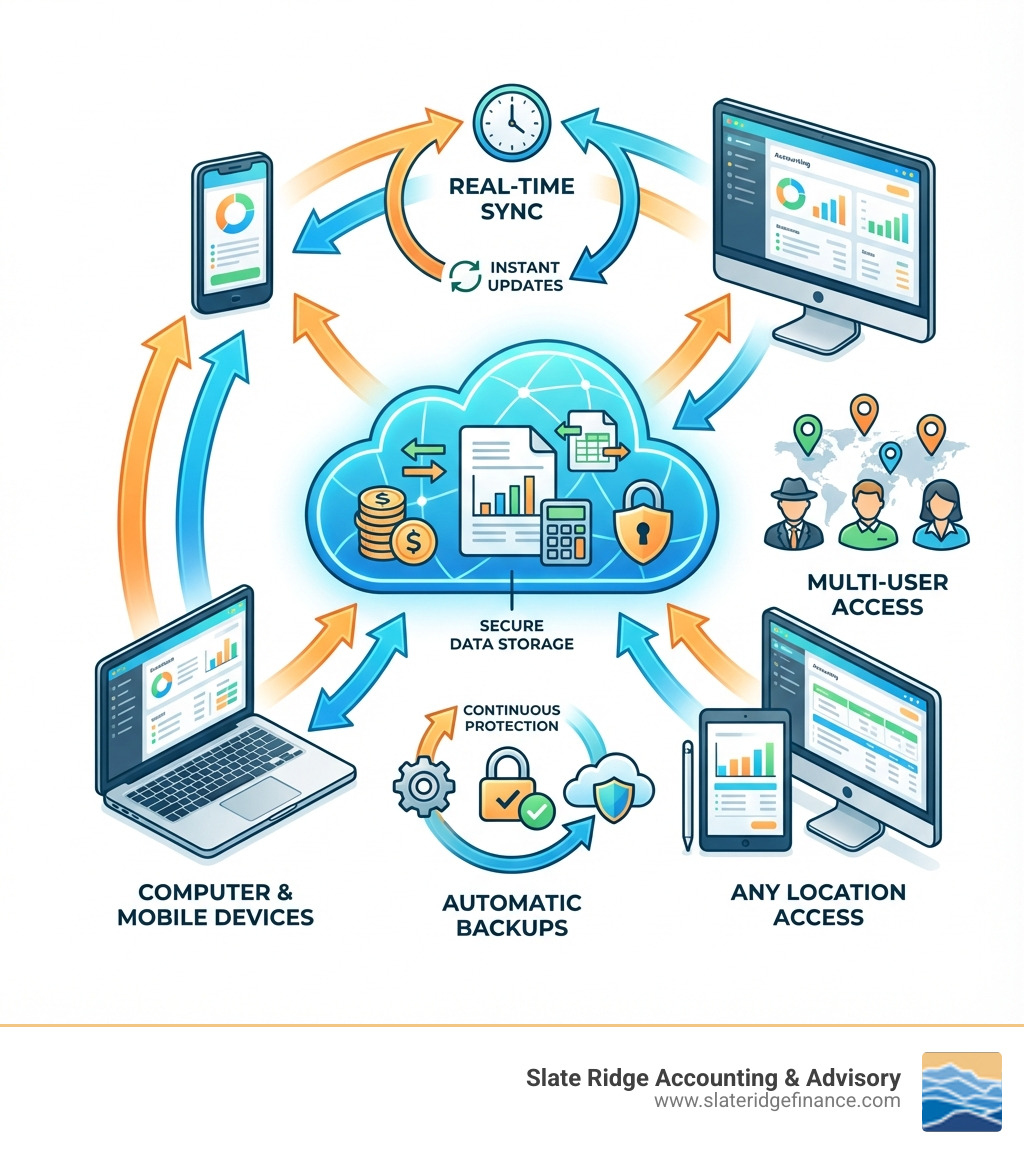
Accounting cloud based systems are changing how businesses manage financial data. Instead of using software on a single computer, cloud accounting is entirely online. Your financial information is stored on secure remote servers, accessible from anywhere with an internet connection.
What is Cloud Accounting?
- Online Access: Financial data lives on the internet, not a local computer.
- Any Device, Anywhere: Access books from a laptop, tablet, or phone.
- Automatic Updates: Software improves automatically without manual installs.
- Real-Time Collaboration: Team members and accountants can work simultaneously.
- Automatic Backups: Data is continuously saved to secure locations.
Just as the first accounting software revolutionized the industry, cloud services are the next major shift. With 94% of accountants now accepting cloud services, the benefits are clear. Cloud accounting transforms business operations, not just digitizing books. This shift is now an essential business practice, with 71% of accounting firms using cloud technology reporting improved profitability.
For business owners struggling with spreadsheets and outdated systems, cloud accounting eliminates manual backups, provides instant financial insights, and enables seamless collaboration with your accounting team. This guide covers the essentials of cloud-based accounting, from its benefits and features to making a successful transition.
Find more about accounting cloud based:
Cloud vs. Desktop: A Fundamental Shift in Accounting
Traditional desktop accounting software was the standard for years, but it was restrictive. Installed on a single computer, it required manual backups, made remote work difficult, and hindered collaboration. If the computer crashed, data was at risk. Sharing files led to version control issues, and updates were a manual, often costly, process.
Accounting cloud based solutions operate on a different principle. The software and data reside on secure remote servers, accessible via the internet. This Software-as-a-Service (SaaS) model means you subscribe to a service, allowing access to your books from any device with an internet connection.
Here's a quick look at how these two approaches stack up:
| Feature | Traditional Desktop Accounting | Cloud-Based Accounting |
|---|---|---|
| Accessibility | Limited to the installed computer; often requires VPN for remote access. | Accessible from any device (laptop, tablet, phone) with an internet connection, anywhere in the world. |
| Data Storage | Stored locally on a single computer or local server. | Stored on secure remote servers in the cloud. |
| Data Backup | Manual backups required; risk of data loss from hardware failure or theft. | Automatic, continuous backups to multiple secure locations; improved disaster recovery. |
| Collaboration | Difficult; often involves sharing files, leading to version control issues. | Seamless multi-user access with real-time updates and role-based permissions. |
| Software Updates | Manual installation of patches or purchasing new versions; can be disruptive. | Automatic updates and upgrades, often happening seamlessly in the background. |
| Cost Structure | Upfront license fee, ongoing maintenance, and IT hardware costs. | Subscription-based (SaaS) pricing, predictable monthly fees, reduced IT overhead. |
| Security | Dependent on local IT infrastructure and user practices; vulnerable to local threats. | Enterprise-grade security, encryption, multi-factor authentication managed by provider. |
What Makes Cloud Accounting Different?
The core difference is flexibility and real-time data. You are no longer tied to a single machine.
- Anytime, Anywhere Access: Check reports from your office in Raleigh, remotely from Asheville, or on your phone. Your financial data is always at your fingertips.
- Real-Time Data Synchronization: Transactions are pulled, accounts reconciled, and reports updated in real-time, providing an immediate and accurate financial picture for faster decisions.
- Automatic Software Updates: The provider handles all maintenance, ensuring you always have the latest features and security without manual installs.
- Scalability: Cloud solutions grow with your business, easily accommodating more users and transactions without major infrastructure changes.
For a deeper dive into how these systems empower small businesses, explore our insights on Online Accounting Software for Small Business.
The End of On-Premises Headaches
Cloud accounting eliminates the need for expensive servers and dedicated IT resources for software management. This reduces IT overhead and frees up capital. Your data is also protected from local hardware failure or theft, ensuring business continuity. With 81% of companies anticipating a significant increase in remote work, managing finances from anywhere is a strategic necessity. Cloud accounting ensures your team, whether in Charlotte or working from home, has uninterrupted access to financial tools.
Core Benefits of Accounting Cloud Based Solutions

Moving to accounting cloud based systems offers tangible advantages that improve efficiency and profitability. Statistics show that 71% of accounting firms using cloud technology reported improved profitability, and 87% of companies felt an acceleration in their business after adopting the cloud. For businesses in North Carolina, this translates to:
- Improved Profitability: Automating tasks and reducing errors saves time and money.
- Business Acceleration: Instant financial insights enable faster, more informed decisions.
- Increased Efficiency: Streamlined workflows allow more focus on strategic growth.
- Flexibility for Remote Teams: Essential tools support effective collaboration for remote and hybrid teams.
Unprecedented Accessibility and Flexibility
One of the most significant benefits of accounting cloud based solutions is the freedom to work from anywhere. You can access complete financial records on a laptop, tablet, or smartphone, whether you're in a client meeting in Greenville or on a business trip. This multi-device access is vital for remote and hybrid work models, ensuring your accounting functions remain robust and accessible, no matter where your team is located.
To truly leverage the power of remote work in our financial operations, explore our Remote Accounting Solutions.
Improved Collaboration for Teams and Advisors
Accounting cloud based systems are built for collaboration, ending the confusion of emailing files back and forth. They offer multi-user access, allowing team members to work in the same data simultaneously. Role-based permissions ensure data security by granting specific access levels to individuals—a bookkeeper can manage transactions while a sales manager views reports. This feature also transforms how you work with accountants. We can securely log in to view up-to-date information and provide timely advice, streamlining workflows and fostering a more efficient partnership.
Learn more about these collaborative advantages and other Modern Accounting Practices.
Superior Data Security and Automatic Backups
Reputable accounting cloud based providers offer security measures that far surpass what most small businesses can implement on their own.
Cloud providers invest heavily in:
- Data Encryption: Data is encrypted in transit and at rest, making it unreadable to unauthorized parties.
- Multi-Factor Authentication (MFA): An extra security layer requires more than just a password to log in.
- Automatic Cloud Backups: Data is continuously backed up, often to multiple geographic locations, ensuring robust disaster recovery. Nearly 58% of Americans use the cloud as the primary method for data backup.
This level of protection is why 67% of accountants prefer cloud accounting to traditional methods when protecting their financial data. It provides enterprise-grade security that is often safer than a local hard drive.
Key Features and Functionalities
Modern accounting cloud based solutions offer a comprehensive suite of integrated tools beyond basic bookkeeping. Core modules typically include:
- General Ledger (GL): Tracks all financial transactions.
- Accounts Payable (AP): Manages money owed to suppliers.
- Accounts Receivable (AR): Tracks customer payments and invoicing.
- Bank Reconciliation: Automatically matches bank transactions.
- Financial Reporting: Generates key reports like P&L statements and Balance Sheets.
These features are the foundation of efficient financial management. A robust Bookkeeping Service for Small Business leverages these cloud-based tools to streamline processes.
Automation: The Engine of Efficiency
Automation is the defining power of accounting cloud based systems. It handles repetitive, error-prone tasks, freeing up your time for strategy. Key automation features include:
- Automated Data Entry: Imports transactions from bank and credit card feeds.
- Optical Character Recognition (OCR): Extracts data from receipt photos for expense tracking.
- Automated Invoicing: Sets up recurring invoices and sends payment reminders.
- Bank Feed Integration: Pulls in bank transactions for easy reconciliation and a real-time cash view.
- Reduced Manual Errors: Automation minimizes typos and miscalculations.
Here are 5 tasks easily automated with cloud accounting:
- Bank and Credit Card Reconciliation
- Expense Categorization
- Invoicing and Payment Reminders
- Payroll Processing (via integration)
- Standard Financial Report Generation
Insightful Financial Reporting and Cash Flow Management
Accounting cloud based solutions turn raw data into actionable insights, helping you understand your financial performance. Key reporting features include:
- Customizable Dashboards: Display key performance indicators (KPIs) like cash position and revenue streams in real-time.
- Real-Time Cash Position: Bank feed integration provides an up-to-the-minute view of cash reserves.
- Cash Flow Forecasting: Tools project future cash flow to aid in strategic planning and avoiding liquidity issues.
- Comprehensive Financial Reporting: Quickly generate standard reports like Profit & Loss, Balance Sheets, and Cash Flow statements.
By automating data input and providing real-time visibility, these systems enable constant monitoring of your financial health, allowing you to identify trends and make proactive decisions to optimize cash flow.
For a complete overview of how these tools can empower your business, consult our Small Business Financial Reporting Complete Guide.
Navigating the Transition: Costs, Challenges, and the Future
Adopting accounting cloud based solutions is a strategic imperative for modern businesses. Data shows 87% of companies feel an acceleration in their business after adopting the cloud, giving them a competitive edge. While there is an initial effort, the long-term benefits are significant.
Understanding the Cost of Accounting Cloud Based Systems
Cloud accounting uses a subscription-based (SaaS) model with predictable monthly or annual fees, unlike traditional software's large upfront license costs. This offers several advantages:
- Predictable Costs: Simplifies budgeting.
- No Large Capital Expenditure: Avoids a significant initial investment in software and hardware.
- Reduced IT Overhead: The provider manages infrastructure, updates, and maintenance.
- Scalability: Pay only for the features and users you need, and scale as your business evolves.
The total cost of ownership (TCO) for cloud accounting is often lower than for on-premise solutions, shifting costs from a capital to an operational expenditure, which benefits cash flow.
For a clear breakdown of how these costs are structured, check out our Monthly Accounting Packages.
Overcoming Migration Challenges
With careful planning, the transition to accounting cloud based systems can be smooth. Key challenges to address include:
- Data Migration: Plan carefully to clean, format, and accurately import historical financial data.
- Employee Training: Provide comprehensive training to ensure team adoption and overcome resistance to new processes.
- Internet Reliability: A stable internet connection is essential, though many providers offer mobile apps with some offline functionality.
- Choosing the Right Provider: Research and select a solution that fits your business's specific needs, features, and budget.
- Working with an Experienced Accountant: An expert can guide you through software selection, data migration, and setup, ensuring a seamless transition.
For practical advice on data transfer, you can See how to convert to Xero from another system, which highlights the importance of working with an experienced professional for a smooth transition.
The Future of Accounting Cloud Based Technology
The evolution of accounting cloud based technology continues, driven by AI, machine learning (ML), and other emerging tech. Future trends include:
- Artificial Intelligence (AI) and Machine Learning (ML): Expect more advanced automation, such as AI-driven fraud detection, predictive analytics, and smarter expense categorization.
- Autonomous Finance: Systems will handle more financial operations with minimal human intervention, allowing finance teams to focus on strategy.
- Blockchain: This technology has the potential to improve security and transparency through immutable transaction records.
- Deeper App Integrations: Seamless connections between accounting software and other business tools (CRM, payroll, e-commerce) will create a unified view of operations.
These advancements will make financial management smarter and more insightful.
To prepare for this exciting future, it's wise to stay informed about the Best Accounting Systems Small Business Guide to ensure your business remains at the forefront of financial technology.
Frequently Asked Questions about Cloud Accounting
Here are answers to common questions about switching to a new system.
Is cloud-based accounting secure?
Yes, reputable accounting cloud based solutions are often more secure than traditional desktop software. Cloud providers use enterprise-grade security that most small businesses cannot replicate. Key features include:
- Advanced Security Protocols: Providers invest in firewalls, intrusion detection, and regular security audits.
- Data Encryption: Data is encrypted both in transit and at rest, making it unreadable to unauthorized parties.
- Multi-Factor Authentication (MFA): Adds an essential layer of security beyond a password.
- Automatic Backups: Data is continuously backed up to multiple secure locations, protecting against local disasters or hardware failure.
Compared to the risks of local data storage like theft or hardware crashes, cloud security is superior. This is why 67% of accountants prefer cloud accounting for protecting financial data.
Does cloud accounting software replace my accountant?
No. Accounting cloud based software is a powerful tool that automates routine tasks, but it cannot replace the strategic advice and expertise of a human accountant. The software handles recording transactions and generating reports, while your accountant interprets that data, offers strategic guidance, and ensures tax compliance.
By automating tasks, cloud accounting frees up your accountant to focus on high-value services like:
- Business strategy and KPI analysis
- Tax planning and compliance
- Financial forecasting and clean-up
- Industry-specific advice
Cloud accounting enables a more collaborative, strategic partnership with your accounting team, allowing us to be proactive advisors.
To understand the full scope of services an accountant provides in this modern landscape, explore our Best Accounting Services Small Biz Guide.
What are the first steps to migrate to the cloud?
Migrating to accounting cloud based solutions involves a few key steps:
- Assess Your Needs: Identify your pain points and essential features (e.g., inventory, project costing).
- Choose a Solution: Research and select a platform that fits your business size, industry, and budget.
- Plan Data Migration: Decide what historical data to transfer and plan the import process for accuracy.
- Involve Your Accountant: A professional service like Slate Ridge Accounting & Advisory can guide you through selection, migration, and setup.
- Train Your Team: Provide adequate training to ensure smooth adoption and maximize the benefits of the new system.
Conclusion
The evolution to accounting cloud based systems is a strategic necessity for businesses seeking agility and data-driven insights. The benefits—unparalleled accessibility, real-time data, improved collaboration, superior security, and powerful automation—lead directly to improved profitability and growth. While the transition requires planning, the long-term gains in efficiency and accuracy are immense.
At Slate Ridge Accounting & Advisory, we understand the needs of North Carolina businesses. Our virtual accounting services are built on modern cloud technology to provide personalized financial solutions. We help you track KPIs, forecast growth, and leverage the cloud to streamline your finances.
Ready to open up the potential of modern financial management for your business? Explore our Virtual Accounting services to modernize your finances.
Ready to get started?
Book a free consultation today and let’s explore how Slate Ridge can support your business with expert accounting that’s accurate, timely, and built around your goals.
You Might Also Like
A few more posts we think you’ll enjoy on topics that matter to business owners like you.