
Why Managing Payroll and Billing Together Changes Everything
Payroll billing software combines two critical business functions—paying your team and invoicing your clients—into one integrated platform. Instead of juggling separate tools and manually transferring data, you get a unified system that handles employee payments, tax calculations, client invoicing, and financial reporting in one place.
Top Payroll Billing Software Solutions:
| Software | Best For | Key Strength | Starting Price |
|---|---|---|---|
| Rippling | Fast-growing companies | Runs payroll in 90 seconds | Custom pricing |
| Square Payroll | Small businesses with POS | Direct POS integration | $35/mo + $6/person |
| Patriot Software | Budget-conscious businesses | USA-based support | $17/mo + $4/person |
| Gusto | Remote & global teams | EOR services | Custom pricing |
| Xero | Cloud-first businesses | Full accounting integration | Varies by region |
If you're currently copying employee hours from one system to another, you're losing time and money. Research shows businesses save an average of $228 per month by switching to integrated solutions, and most can run payroll in under 3 minutes.
The problem with separate systems goes beyond wasted time. Manual data transfers create opportunities for errors that affect paychecks and client project costs. When payroll and billing systems don't communicate, you're keeping two sets of books that never match.
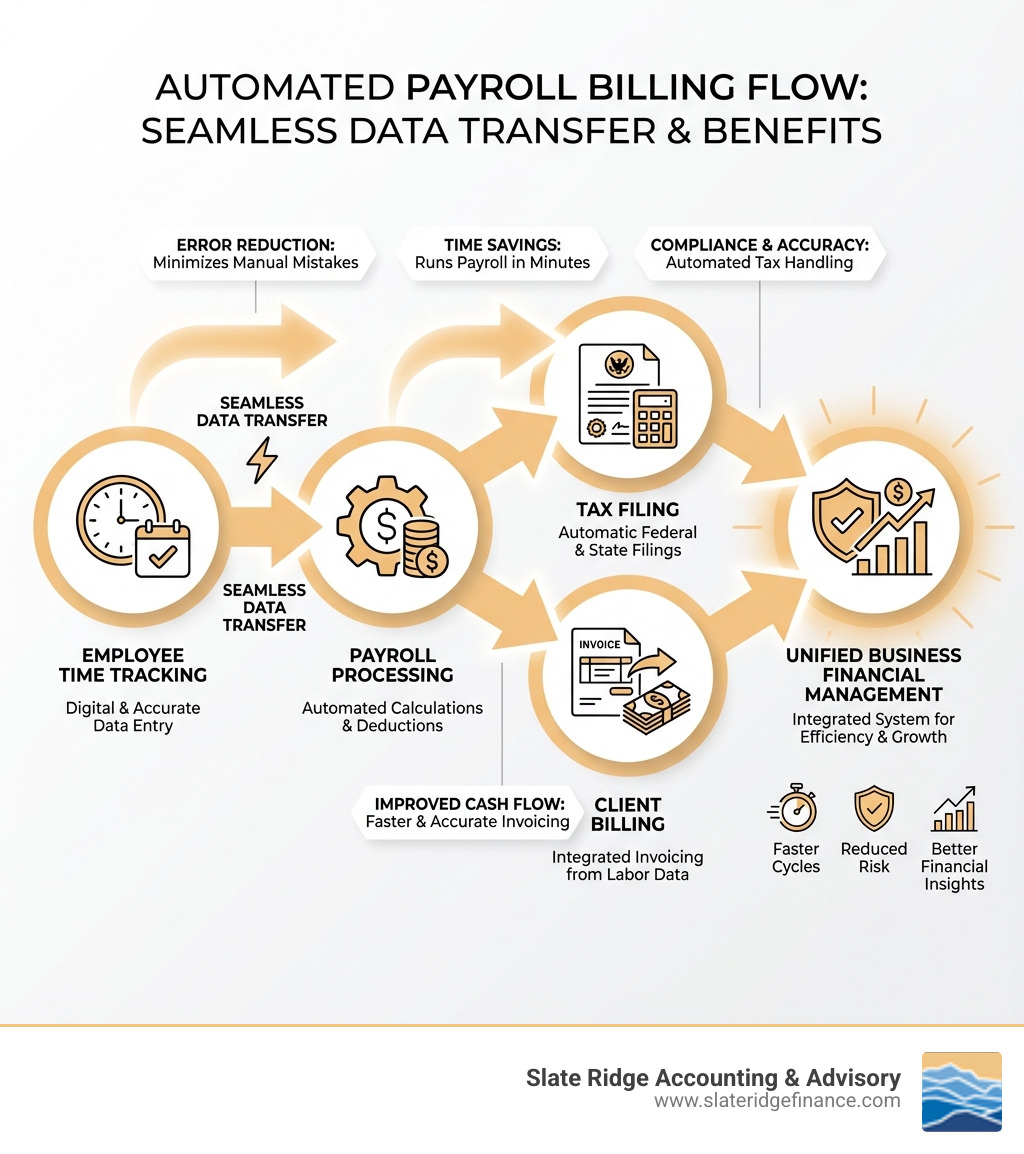
Modern payroll billing software eliminates these headaches. When an employee clocks in, that data flows automatically to payroll, tax withholdings, and client invoices. No double-entry, no reconciliation nightmares, and no wondering if your numbers are accurate.
Integrated systems also improve compliance. The software automatically calculates and files federal, state, and local taxes, and generates year-end W-2s and 1099s. This automation is essential for businesses with employees in multiple states.
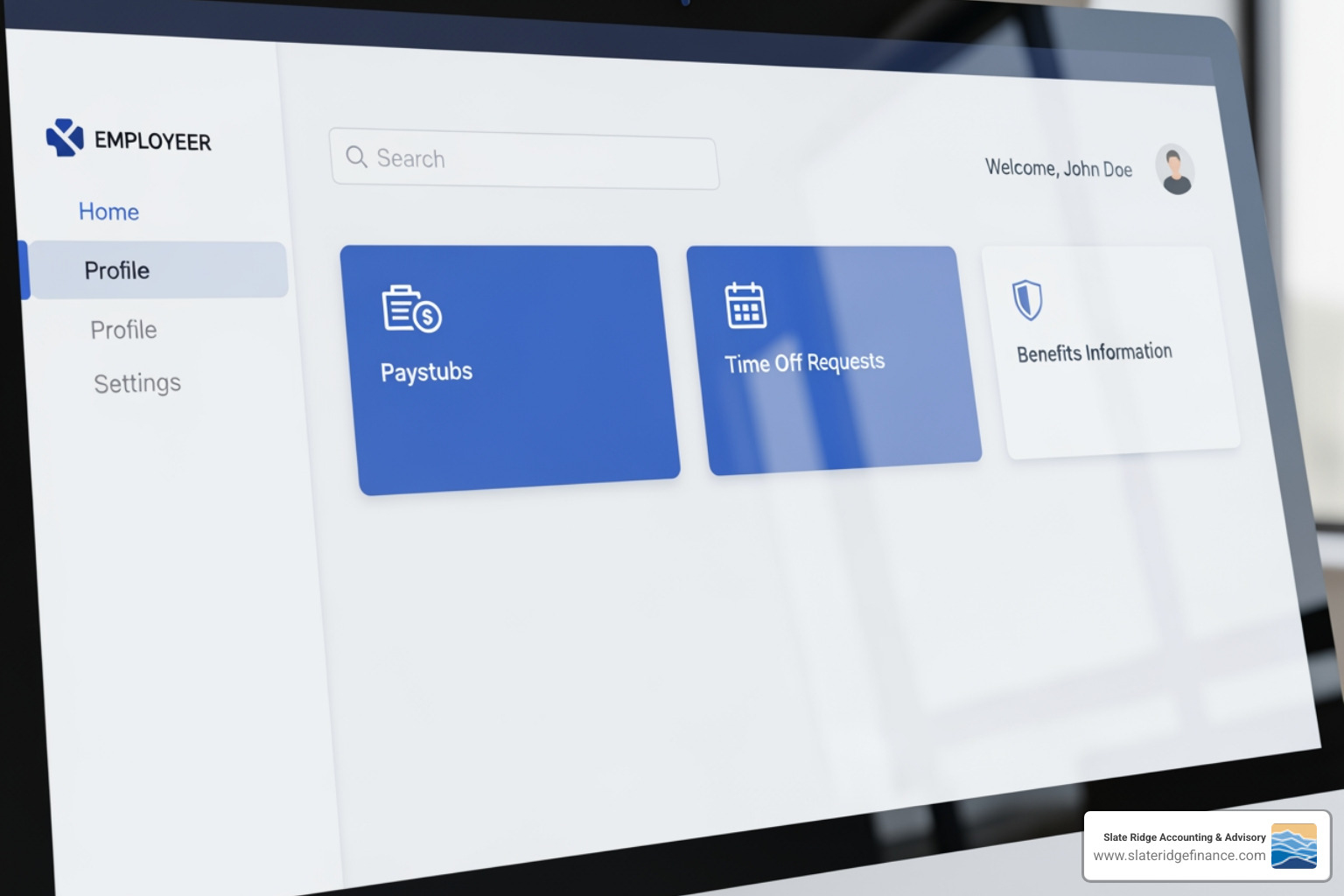
These platforms also offer employee self-service portals for viewing paystubs and requesting time off. Real-time reporting lets you track labor costs by project, monitor profitability, and make informed business decisions.
What is Integrated Payroll and Billing Software?
At its heart, integrated payroll billing software is a unified system designed to manage employee compensation and client invoicing. It handles two major administrative burdens simultaneously, making life easier for businesses across North Carolina, from Asheville to Wilmington.
Its core functions streamline the entire pay-to-bill cycle. For payroll, this includes calculating wages, deductions, and taxes, and issuing payments. For billing, it involves creating invoices, tracking billable hours, and managing client payments. The key is that these two functions are seamlessly connected.
Standalone systems create data silos, requiring manual data transfer that is prone to errors. Integrated software, however, operates on a single database concept. As Paycom emphasizes, you can't truly automate without a single database. All employee data, time tracking, project costs, and client billing information reside in one central location. This unified data flow enables significant efficiency improvements and error reduction. Patriot Software, for example, boasts that its customers can run payroll in under 3 minutes, with some saving over $228 per month. This kind of Financial Process Optimization is what we help businesses achieve.
The Core Benefits of a Unified System
The advantages of embracing integrated payroll billing software are clear and compelling:
- Increased Accuracy: Eliminating manual data entry between systems drastically reduces human error. When time worked flows directly to payroll and client invoices, the numbers remain consistent, building trust.
- Improved Cash Flow: Streamlined billing means faster invoices and payments. Tying billing to payroll provides a clear cost picture, allowing for prompt invoicing and better cash flow management.
- Reduced Administrative Burden: Integrated systems automate routine tasks, saving hours spent reconciling data. This frees up your team for strategic initiatives. Businesses can save hundreds monthly and run payroll in minutes.
- Centralized Data: A single platform for payroll and billing data provides a comprehensive financial overview, simplifying reporting, auditing, and analysis.
- Improved Financial Reporting Services: Unified data makes it easy to generate insightful reports. You can analyze labor costs against revenue, track client profitability, and gain a deeper understanding of your financial health.
- Significant Time Savings: The time saved is a tangible benefit. Rippling can process payroll in 90 seconds, and Patriot Software's customers average under 3 minutes. This is a competitive advantage.
How It Differs from Separate Payroll and Billing Tools
The traditional approach of using separate tools leads to "data silos," where information gets trapped in individual systems.
- Data Silos Problem: When payroll and billing systems don't communicate, data becomes siloed. You might have accurate payroll, but without linking it to billable projects, you're missing a critical piece of the puzzle.
- Manual Reconciliation: Without integration, businesses face time-consuming, error-prone manual reconciliation, comparing reports from separate systems to ensure they match.
- Discrepancy Risks: Each manual step introduces risks of discrepancies. A single error can lead to incorrect invoices, paychecks, or compliance issues, which can snowball into significant problems.
- Single Source of Truth: Integrated payroll billing software creates a "single source of truth." All data—from hours and wages to projects and invoices—is managed in one platform, ensuring consistency and accuracy.
- Seamless Data Flow: Integration provides a seamless, automated data flow. For example, tracked project time can automatically populate payroll timesheets and generate client invoices, eliminating redundancy and keeping financial records synchronized, aligning with Modern Accounting Practices.
Key Features to Look For in Payroll Billing Software
Choosing the right payroll billing software for your North Carolina business means looking beyond the basics. You need a system that offers robust automation, seamless integration, top-tier security, and the flexibility to scale with your growth.
An effective solution will simplify operations, reduce errors, and free up your time. For businesses utilizing Cloud Payroll Management, these features are even more critical, ensuring accessibility and efficiency from anywhere.
Essential Payroll and HR Functions
The payroll component should be comprehensive, handling everything from basic calculations to complex compliance.
- Automated Calculations: The software should automatically calculate gross-to-net pay, including all deductions, overtime, and holiday pay, as highlighted by MITC's integration capabilities.
- Tax Deductions: It must accurately calculate and withhold federal, state, and local taxes, which is vital for businesses with employees in multiple jurisdictions.
- Direct Deposit: Offering free direct deposit is a standard expectation, ensuring employees receive their pay quickly and securely.
- Support for Contractors & W-2 Employees: The software must handle both W-2 employees and 1099 contractors, including generating year-end W-2 and 1099-NEC forms. Square Payroll, for instance, offers contractor-only plans.
- Time Tracking: Integrated time tracking is crucial. Employees can clock in, track project hours, and manage PTO, with data flowing directly to payroll. Rippling and Square Payroll offer robust options.
- PTO Management: The system should let you customize PTO policies, track accruals, and manage requests. Xero, for example, automatically adjusts leave balances. These features are key to effective Payroll Administration Services.
Critical Billing and Invoicing Capabilities
The billing side is equally important, ensuring you get paid accurately and on time.
- Automated Invoice Generation: The system should automatically create invoices based on tracked time, expenses, or project milestones to speed up the billing cycle.
- Project-Based Billing: Link employee time and expenses directly to specific projects for accurate invoicing.
- Time-Based Billing: For service-based businesses, the ability to convert tracked hours into billable time on an invoice is essential.
- Expense Tracking: Easily track, categorize, and bill expenses back to clients or factor them into project costs.
- Payment Processing Integration: Integrate with payment gateways to accept online payments, speeding up your cash flow and reducing the need for Accounts Receivable Outsourcing.
The Role of Employee Self-Service in Modern Payroll Billing Software
Modern software empowers your employees, reducing administrative workload and increasing satisfaction.
Here's what to look for:
- Mobile App Access: A mobile app allows employees to access their information on the go.
- Viewing Paystubs: Employees can securely view and download current and historical paystubs anytime.
- Requesting Time Off: Employees can submit PTO requests directly through the portal for manager approval.
- Updating Personal Information: Employees can update their contact details and tax withholding information, ensuring records are current.
- Reduced HR Workload: Self-service allows your HR and payroll teams in North Carolina to focus on more strategic initiatives.
- Employee Empowerment: Giving employees direct access to their data fosters transparency. Paycom, for example, emphasizes empowering employees to take ownership of their payroll.
Security and Data Protection
The security of your sensitive payroll and billing data is paramount.
- Data Encryption: All data, both in transit and at rest, should be encrypted to protect it from unauthorized access.
- Multi-Factor Authentication (MFA): MFA adds a crucial layer of security against phishing and credential theft.
- SOC 2 Compliance: Look for providers with regular audits, such as SOC 2 Type 2 (like Rippling), which indicate a commitment to data security.
- GDPR/CCPA Adherence: Adherence to high data privacy standards like GDPR and CCPA demonstrates a global commitment to protecting personal information. Thomson Reuters' Privacy Statement highlights this importance.
- Secure Document Storage: The software should provide secure, cloud-based storage for all payroll and billing documents.
Streamlining Compliance, Integrations, and Reporting
Beyond day-to-day operations, effective payroll billing software helps your business steer complex compliance, integrate with other tools, and gain invaluable insights from your financial data. This is where your software becomes a strategic asset for your business in North Carolina.
Mastering Tax Compliance and Filings
Integrated software makes managing tax compliance much easier.
- Automated Tax Filing: The software should automatically calculate and file federal, state, and local payroll taxes. Rippling, for instance, offers automatic tax-filing, even when employees move.
- Federal, State, Local Taxes: This includes handling federal IRS requirements and North Carolina state and local taxes. Square Payroll handles ongoing state and federal tax filings.
- W-2/1099 Form Generation: The software should automatically generate and file year-end W-2s for employees and 1099-NECs for contractors.
- New Hire Reporting: Compliance often requires reporting new hires to state agencies, a task that integrated software can automate.
Integration with Your Existing Business Systems
The power of modern payroll billing software lies in its ability to integrate with the other tools you use.
- Accounting and Payroll Services for Small Business: Seamless integration with accounting software like QuickBooks or Xero is crucial. This keeps your general ledger updated, eliminating manual data entry. Rippling syncs with over 400 apps.
- HR Software Integration: Ensure your payroll software can integrate with any separate HR platform you use. Paycom emphasizes a single database for HR and payroll.
- CRM Integration: Connecting with your CRM can help link client projects and billing directly to customer records.
- Project Management Tools: Integration with project management software allows for accurate time tracking against projects, which then feeds into billing.
- API Access & App Marketplaces: Look for platforms with open APIs or extensive app marketplaces (like the Xero App Store) for custom integrations.
Gaining Business Insights with Advanced Financial Reporting
Integrated software transforms raw data into actionable insights for smarter decision-making.
- Custom Report Builder: The ability to create custom reports to answer your unique business questions is invaluable.
- Job Costing Reports: Understand the true cost and profitability of each project by analyzing labor and material costs.
- Labor Cost Analysis: Gain deep insights into labor expenses, identifying trends, overtime costs, and areas for efficiency.
- Profitability by Project: By combining payroll costs with project revenue, you can pinpoint which projects or clients are most profitable.
- Financial Performance Analysis: Integrated data allows for thorough financial performance analyses, tracking KPIs and forecasting growth more accurately. This is a core offering at Slate Ridge Accounting & Advisory.
- Data Visualization: Look for dashboards and reporting tools that present data in easy-to-understand visual formats for quicker decision-making.
How to Choose the Right Payroll Billing Software
Selecting the ideal payroll billing software isn't a one-size-fits-all decision. It requires a careful evaluation of your specific business needs, growth trajectory, and operational complexities. For businesses in North Carolina, from small startups in Boone to established firms in Charlotte, making the right choice can significantly impact efficiency and profitability.
Understanding Pricing Models
Pricing for payroll billing software can vary widely, and understanding the different models is key to budgeting effectively.
| Pricing Model | Description | Example | Considerations |
|---|---|---|---|
| Per-Employee-Per-Month (PEPM) | A base fee plus a monthly charge per active employee/contractor. | Square Payroll: $35/mo + $6/person | Scalable, but costs rise with headcount. |
| Base Fee + Per User | A flat monthly fee for the software, plus a per-user charge (often for administrators). | Patriot Software: $17/mo + $4/worker | Good for businesses with consistent staff. |
| Tiered Pricing | Different packages with varying features and price points. | Many providers offer basic, standard, premium tiers. | Choose a tier that meets current and future needs. |
| Custom Pricing | Negotiated pricing, typically for larger enterprises or complex needs. | Rippling, Gusto (for EOR) | Requires direct contact with sales. |
We highly recommend using free trials to test features and usability before committing. Watch for hidden fees for tax filing, year-end forms, or support. Our Small Business Payroll Cost Guide can help you steer these costs.
Evaluating Your Specific Business Needs
Before diving into demos, take time to assess your unique requirements.
Here are some evaluation questions:
- Number of Employees: How many W-2 employees and 1099 contractors do you currently have, and how many do you anticipate hiring in the next 1-3 years?
- Employee Types: Do you primarily have full-time employees, part-timers, seasonal workers, or a mix of W-2s and 1099s?
- Multi-State Operations: Do you have employees working in different states, or will you in the future? This is particularly relevant for businesses in North Carolina that might employ remote workers in other states, requiring complex tax compliance.
- Industry-Specific Needs: Does your industry have unique payroll or billing requirements? For example, a SaaS company might need robust project tracking for billing, while Healthcare providers have specific compliance needs.
- Future Growth Plans: How quickly do you expect your business to grow? Choose a solution that can scale with you, offering additional features or higher tiers as your needs evolve.
- Integration Requirements: What other software do you currently use (accounting, CRM, HR, project management) that needs to integrate seamlessly with your new payroll billing system?
Mitigating Potential Challenges
Even with the best software, implementing a new system can present challenges. Being prepared can make the transition smoother.
- Implementation Complexity: Some systems are complex to set up. Look for providers with clear onboarding guides, setup assistance, or professional services.
- Data Migration: Transferring historical data can be daunting. Ensure the provider offers tools or support for efficient data migration.
- Employee Training: Your team will need training, especially for self-service features. Look for intuitive interfaces and good training resources.
- Overcoming Resistance to Change: Communicate the benefits of the new system clearly to your team and involve them in the process to foster buy-in and overcome resistance to change.
- Choosing a Scalable Solution: Select a scalable solution that can handle future growth in employees and complexity. This prevents a costly migration later and aligns with your Business Growth Strategies.
Frequently Asked Questions about Payroll and Billing Software
We understand you likely have questions about how these powerful tools can transform your operations. Here are some common inquiries we address for North Carolina businesses.
How quickly can you run payroll with modern software?
A compelling benefit of modern payroll billing software is its speed. With automation and synced HR data, running payroll is incredibly fast. Rippling states payroll can run in 90 seconds, while Patriot Software's customers average under 3 minutes. This speed comes from eliminating manual data entry, as hours and deductions are pulled automatically. This frees up time to focus on your business. Direct deposit options also ensure prompt employee payments.
Can this software handle payments for both W-2 employees and 1099 contractors?
Absolutely! A robust payroll billing software is designed to manage payments for both W-2 employees and 1099 contractors, albeit with distinct processes to ensure compliance.
- W-2 Employees: For W-2 employees, the software handles gross-to-net pay calculations, tax withholdings, benefit deductions, and year-end W-2 generation.
- 1099 Contractors: For 1099 contractors, it manages gross payments and generates year-end 1099-NEC forms without withholding taxes. Square Payroll offers contractor-only plans with 1099-NEC filing.
- Onboarding Differences: The software assists with correct onboarding for each worker type, ensuring proper W-4 or W-9 form collection.
- Payment Flexibility: Both worker types can typically be paid via direct deposit, with check options available.
This flexibility is crucial for Payroll Services for Startups and established businesses alike, allowing them to manage diverse workforces from a single platform.
How does the software support businesses with employees in multiple states?
For businesses with employees across state lines, managing multi-state payroll can be a compliance nightmare. Integrated payroll billing software is a lifesaver in these scenarios.
- Tax Jurisdiction Complexity: Each state has unique tax laws. Manually tracking them can lead to costly errors.
- Automated Tax Rate Updates: The software automatically updates tax rates for all jurisdictions, ensuring accuracy. Rippling, for example, automates tax filing even when employees move.
- Compliance Management: The system manages state-specific compliance, including new hire reporting and state tax forms.
- Setting Up Work Locations: Platforms let you set up multiple work locations to ensure correct tax allocation. Square Payroll, for example, handles multi-state tax calculations.
- Unemployment Tax Handling: The software ensures unemployment taxes are paid to the correct state, a critical feature for businesses with remote employees.
Conclusion
Embracing integrated payroll billing software is more than just an upgrade; it's a strategic move that fundamentally transforms how your North Carolina business operates. We've seen how these powerful platforms streamline processes, improve accuracy, ensure compliance, and provide invaluable insights. From saving precious time and money to empowering your employees with self-service options, the benefits are far-reaching.
By unifying your payroll and billing, you eliminate data silos and manual errors, gaining a single source of truth for your financial data. This efficiency allows you to focus on what truly matters: growing your business, serving your clients, and fostering a productive team, whether you're in Asheville, Raleigh, or any other vibrant community across North Carolina.
At Slate Ridge Accounting & Advisory, we understand the nuances of financial management for small businesses. We pride ourselves on providing modern, personalized, and industry-custom financial solutions, helping you track KPIs and forecast growth. Integrating the right payroll billing software is a cornerstone of this approach.
Don't let manual processes hold your business back. The future of financial management is integrated, automated, and insightful.
Ready to get started?
Book a free consultation today and let’s explore how Slate Ridge can support your business with expert accounting that’s accurate, timely, and built around your goals.
You Might Also Like
A few more posts we think you’ll enjoy on topics that matter to business owners like you.